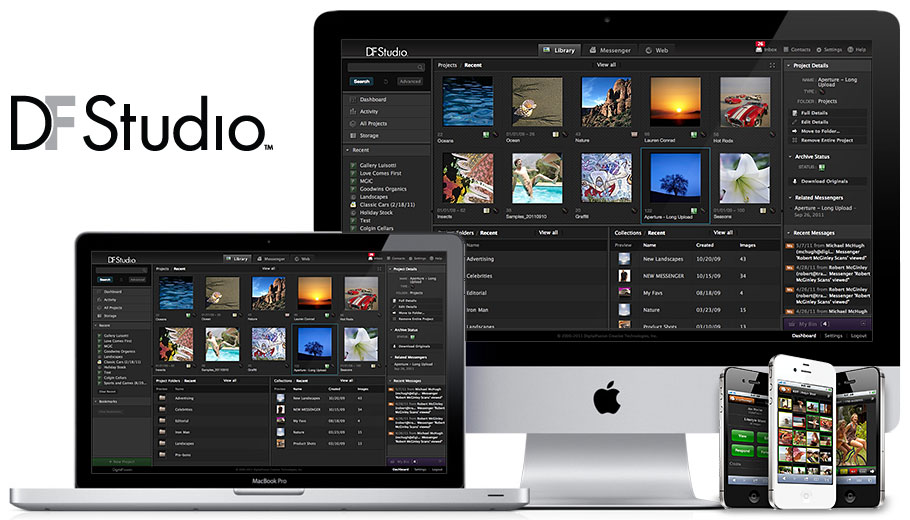
DF Studio™ - Online Job Editing, Delivery and Archiving
The Only Online Solution Designed for the Professional Workflow

DF Studio — Online Editing, Delivery & Collaboration

Imagine quickly editing your shoot online and delivering your selects to your client efficiently and securely. DF Studio, DigitalFusion's leading online solution designed for the needs of professional photographers enables you do to that and more — all from anywhere you have an Internet connection. Once the job is complete, DF Studio provides you with a permanent online record of the shoot and your selects and can be combined with DigitalFusion's Archive service to safely and securely store your digital assets.

Want to learn more? Sign-up today for a risk-free 14-day trial to experience DF Studio yourself!

DF Studio Version 4

Now available, DF Studio™  Version 4 is iPhone enabled. DF Studio's imageMesseners have been re-designed to enable viewing and editing on Apple's iPhone. Addtionally, Version 4 includes a simplified design for sending imageMessengers and preparing imagePortfolios and it includes a number of new methods for creating and managing edits. Along with DF Studio Version 4, DigitalFusion has also updated its DF Studio LINK and its DF Studio LINK plug-in for Aperture.

  • iPhone Enabled
  • Improved User-Interface
  • New Edit Management
  • Updated Archiving Support
  • New Address Book Features
  • New imagePortfolio Templates

* DF Studio LINK is available now for Mac OS, and coming soon for Windows.


DF Studio, a Standard for The Future

DF Studio delivers on the promise of professional digital photography by standardizing your workflow making you and your clients more organized and efficient. DF Studio empowers you by delivering a rich editing and job management solution coupled with an interactive experience that allows clients to create their own edits and collaborate with you at the speed of the Internet.

Proof, Edit & Manage Your Work — All Online — From Anywhere

As soon as a job is loaded into DF Studio, you can begin the editing process. DF Studio’s editing features rival the ease and speed professionals are accustomed to when marking up a contact sheet with a grease pencil.

Job Management

DF Studio organizes jobs in the exact same way as photographers do – by subject, client and shoot date. When you login you are presented with a list of recent jobs, imageMessengers, and critical events such as client edits or recent jobs posted to the system. You can quickly view all of the the images from one job or do keyword searches across multiple jobs. DFStudio has been designed to store every job over the length of your career.

iPS™ – Internet Proof Sheet

DF Studio organizes all of the images from your shoot by setup and select level. You quickly edit by setting select levels (first, second and kill). Using DF Studio’s FastEdit™ feature you speed through the editing process by using simple keyboard commands and the system automatically advances to the next image.

Full-Size Editing

To ensure that you can tell if the shot is sharp, or the details you envisioned are in the file, you can view one-to-one JPEGs of the image either by displaying the full-size image in a separate window or using DF Studio’s loupe tool to scan over portions of the image. The DF Studio team has optimized the delivery of these images so that most users can see the image in just a few seconds on a high-speed connection.

imageMessenger™

imageMessenger enables you to electronically deliver your selects to your clients in a consistent and reliable way. Your client receives a formatted email and simply clicks on the secure link to access the images organized and presented as you intended.

That night I viewed the shoot online, made my selects and delivered them to my client within hours of the shoot. I couldn’t have done that without shooting digitally and using DF Studio.

On the client side, imageMessenger includes the entire suite of editing tools enabling your clients to make their own selects and return an edit to you with comments and notes. Clients can also print formatted proof sheets, download JPEGs (preview and full-size) and forward the imageMessenger onto their associates. imageMessenger keeps you in control by enabling you to view and manage access to the images securely.

Digital Image Archiving

The last link in the chain of professional digital photography is the burden of managing and storing digital assets. Digital archiving requires an investment in both storage and time to ensure the archive is well-organized and safely backed-up. With DF Studio, archiving is built-in. The system tracks both the JPEGs used for DF Studio’s features and the RAW, TIFF or other high-resolution master files associated with the job, providing a secure and redundant system for all of your imagery.


For more information contact the DF Studio team.